Buy Now
Products
  • Blog
  • What's new
  • Newsletter
  • Zoom Player
  • Zoom Player Awards
  • Zoom Player Press
Downloads
  • Zoom Player MAX
  • Zoom Player STREAM
  • Zoom Player Remote
  • Zoom Player Skins
  • Zoom Player MAX Beta
  • Zoom Player STREAM Beta
  • Clip Chopper
  • AI Subtitle Creator
  • Backgrounds
  • Graphic Assets
  • Other Downloads
Support
  • Zoom Player Help
  • Zoom Player Interface
  • Zoom Player on Tablets
  • Video Tutorials
  • Support on Reddit
  • Customer Support
Guides
  • SETUParrow
    • Formats & Decoders
    • Options & Settings
    • Media Library Basics
    • Media Library Scraping
    • Video Streaming
    • Skin Selection
    • Streaming
    • Presets
    • Calibration Patterns
    • Articles
    • Resources
    • FAQ
  • CONTROLarrow
    • Keyboard Shortcuts
    • Remote Control
    • Command Line
    • Control API
    • Zoom Player Functions
  • THE USER INTERFACEarrow
    • Screenshots
    • Fullscreen Navigation
    • The Control Bar
    • The Playlist
    • The Equalizer
    • Video Streaming
    • Chapters & Bookmarks
    • The Scheduler
    • Dynamic Video Editing
Contact
  • Customer Support
  • Licensing & Marketing
  • Business Development
  • Affiliate Signup
  • Client Showcase
  • About Inmatrix
  • Buy Now                           
  • Productsarrow
    • Blog
    • What's new
    • Newsletter
    • Zoom Player
    • Zoom Player Awards
    • Zoom Player Press
  • Downloadsarrow
    • Zoom Player MAX
    • Zoom Player STREAM
    • Zoom Player Remote
    • Zoom Player Skins
    • Zoom Player MAX Beta
    • Zoom Player STREAM Beta
    • Clip Chopper
    • AI Subtitle Creator
    • Backgrounds
    • Graphic Assets
    • Other Downloads
  • Supportarrow
    • Zoom Player Help
    • Zoom Player Interface
    • Zoom Player on Tablets
    • Video Tutorials
    • Support on Reddit
    • Customer Support
  • Guidesarrow
    • FAQ
    • Articles
    • Screenshots
    • Backgrounds
    • Fullscreen Navigation
    • Playlist
    • Equalizer
    • Control Bar
    • Skin Selection
    • Media Library Basics
    • Media Library Scraping
    • Scheduler
    • Remote Control
    • Command Line
    • Functions
    • Control API
    • Options & Settings
    • Keyboard Shortcuts
    • Formats & Decoders
    • Chapters & Bookmarks
    • Dynamic Video Editing
    • Presets
    • Calibration Patterns
    • Streaming
    • Resources
    • Graphic Assets
  • Contactarrow
    • Customer Support
    • Licensing & Marketing
    • Business Development
    • Affiliate Signup
    • Client Showcase
    • About Inmatrix

Modernizing Zoom Player's interfaces using AI
Modernizing Zoom Player's interfaces using AI

Published August 31st, 2026

One of the new possibilities afforded to me by using AI as part of the development process is performing momentous, tedious tasks that would take me weeks to months of work with relatively little "wow" factor.

AI creates new opportunities

The models these days have reached a point at which they can write code that never existed in one coding language by translating the code from examples in other coding language.

Enhancing legacy code

Zoom Player is developed in Delphi 7, a compiler that's 25 years old now. Many of the newer UI APIs (application programming interfaces) were never written to support Delphi 7 and translating books worth of API calls is something I just don't have in me. Now, the AI can translate the code with Delphi 7 compatibility directly based on Microsoft's API samples. This finally allows me to integrate the latest Microsoft font-rendering technology, DirectWrite for text and Direct2D for shapes!

You're probably asking yourself what does this even mean!? In practice these Microsoft APIs are used for hardware accelerated text and shape rendering. So Speed! and Color Emojis🎉! DirectWrite is the only Microsoft API capable of rendering color emojis in text.

Modernizing the Media Library Category Editor

The next step was updating an entire interface!
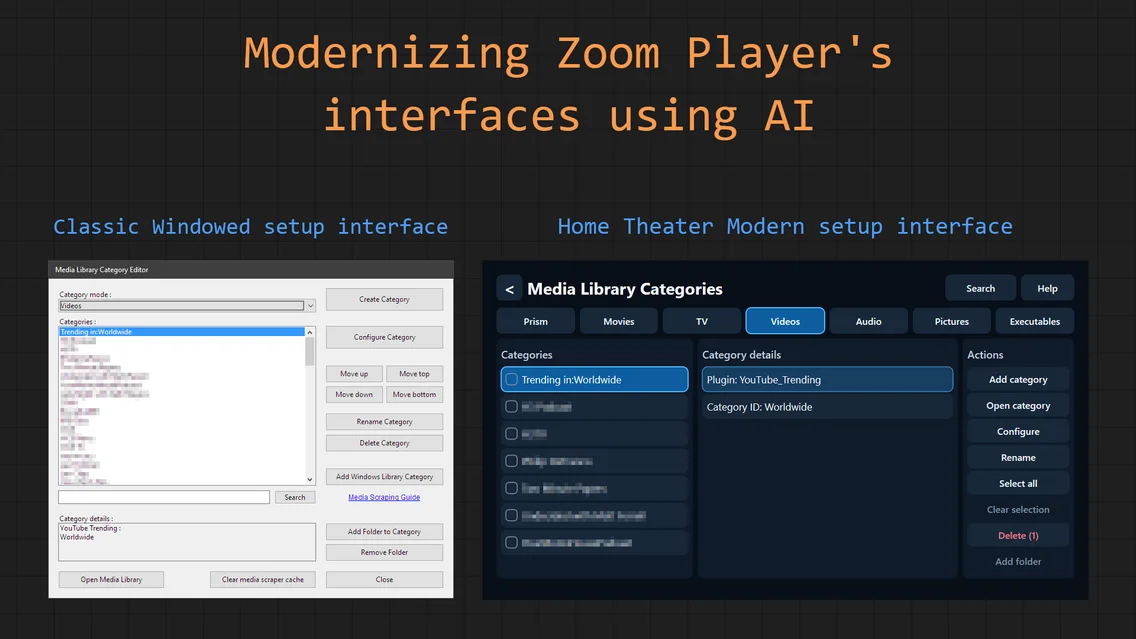
One of Zoom Player's biggest weaknesses is that setting up the media library categories while in home theater mode (e.g. watching on a TV), you had to use an outdated windows user interface that wasn't really designed for a Home Theater environment. You were forced to use a mouse and a keyboard. A remote control or keyboard were not an option and I'm aware that's not the best user experience.

My "big plan" is to attack this weakness by using AI to create a new Home Theater Media Library Category Editor. All the back-end saving/loading/parsing/logic code are already in place, all that had to change was the user interface rendering.

I've now tasked AI to create the new interface by using the existing back-end code and rewriting the user interface using the newer Direct2D/DirectWrite APIs. I was finally able to support all those colorful Emojis you've been longing for 🤗 (and faster font rendering).

A good start

The attached screenshot represents the 4th round of fix-ups on the new interface and there's plenty more to go. Soon, I'll have a new category editor interface to present that looks modern and provides an easy setup route in a Home Theater environment.

What's next?

And with that, one of Zoom Player's weaknesses would be eliminated. What other interfaces would you like to see modernize?

This text was 100% written by a human, xcuze any typos or mediocre grammar.


Attribution • Privacy Policy • Terms of Usage
Discord Facebook Youtube Reddit