
My big plan for version 23

There are still a few cool features to complete for Zoom Player version 22's branch in the coming months (new beta hopefully this week), but there are major issues and features that's have come up more and more recently which I hope to address (with your help) in version 23.
What are my plan's goals?
I plan to address 3 major, long standing issues/features :
- No more user interface freezes or long stalls while media is loading or seeking.
- 64-bit support with AI upscaling.
- Multiple concurrent side-by-side video wall playback.
What does the plan involve?
Right now Zoom Player is essentially a smart and highly customizable user interface that sits on top of multiple playback engines and presentation technologies (Microsoft's DirectShow media engine, MPC-VR & MadVR video rendering technologies, libVLC media engine, Embedded browser technologies and a multitude of image decoding libraries).
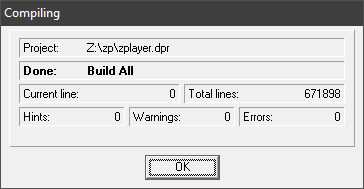
Currently, not including 3rd party pre-compiled code, Zoom Player's code base compiles to about 670k lines of code.
Converting the entire codebase to 64bit is impractical, there's so much optimized code designed for 32bit that it would take years to convert to 64bit with the same level of stability and performance.
What's the solution? Extracting Zoom Player's media presentation engine to a separate process.
As you may know, many applications today use a separate process for the user interface and the presentation engine. The biggest example of this are browsers. If you check in Windows' task manager (under the details tab), you'll notice that there are quite a few browser processes running even if you only have one browser window open.
If a tab becomes unresponsive, the browser can just kill the process behind the tab without the entire browser becoming unresponsive.
The benefits
Freezing
Separating the user interface from the media presentation engine means that if something goes wrong, for example, if the media engine freezes or stalls for a long time on a seek operation, something that can happen due to many factors beyond my control and with no ability to do anything about, Zoom Player can detect the frozen presentation process and just terminate it without freezing the user interface.
Another benefit to this approach is that the user interface isn't frozen while the media is being loaded. This has great benefits when dealing with slow network processes. If a server takes too long to respond, you can just kill the process and try playing something else without having to wait for the server to "time out".
64bit support
With Zoom Player's media presentation engine running in a separate process, I would no longer have to convert Zoom Player's entire code base to 64bit, just the media presentation engine. While this is still a massive undertaking, it's a more manageable task compared to converting the entire code base.
64bit support has the benefit of access to AI based image up-scaling from NVIDIA based on libVLC's integration, slightly faster software video decoding (not a great benefit in most cases as hardware decoding is usually available on the GPU/CPU anyways) and access to a larger frame buffer (might be helpful when decoding 8K/12K video).
Video Wall
The ability to have a detached media presentation layer would allow me to more easily implement a video wall feature to simultaneously display multiple videos from multiple sources using multiple media engines (DirectShow/libVLC/etc) at the same time with a layout you can personally customize to your liking across one or more screens.
How you can help
This is a major undertaking, months of work, possibly a year for me to get everything working well with all of Zoom Player's multiple customization options and vast feature-set.
As you can see, I'm working daily to improve Zoom Player and I could really use your support. Please purchase/gift licenses and spread word of my work to help grow the community.
If you think of anything you can personally do to help me achieve these goals and help Zoom Player become the ultimate media player for Windows, I'm very interested in listening.