
Maximizing TV Playback
Diagram #1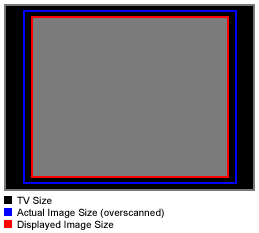
|
"Diagram #1" depicts your typical television set.
The red outline defines your visual screen area. This is the visible area of the screen that is displayed on the TV set. What most people don't realize, is that the actual broadcasted image is usually 5%-15% larger than the displayed image. The blue outline defines the actual broadcasted image size, which is being cropped by the TV set.
The reasoning behind this "over scanning" of the TV signal, is that there are certain uncontrollable elements that can change the position and size of the visual screen area. These include movement of the TV set during shipping, brightness scaling (more on that later) and many others...
Basically the TV manufacturers save themselves a technical support headache by having the image scaled beyond the visible screen boundaries. Thus, any small movement of the broadcasted image would not be seen within the visible screen area.
| PREVIOUS | NEXT |