
Zoom Player's Smart Play
Zoom Player's Smart Play
This guide will explain the inner workings of Zoom Player's Smart Play technology and how it can be utilized to prevent filter conflicts and build customized media graphs with minimal effort.
But first, a little background. To play a media file, a series of components (from here on referred to as "Filters") are linked together to form a Filter Graph (from here on referred to as "Graph"). Each Filter in the graph has a job. One filter reads the data from a Hard Drive, CD or a network source (Source Filter), a second filter will take the data and split the content into Audio, Video and other types of data-streams (Splitter Filter). From there the data is fed into filters that decode the compressed data as RAW Audio/Video (Decoder Filters), this data can then be modified/enhanced by additional filters (Transform Filters) and lastly the data is processed by filters that interface directly with your hardware to display the Video and Play the Audio (Rendering Filters).
Here is an image taken from GraphEdit (a tool from Microsoft for manually building Graphs) illustrating how a DIVX video with MP3 audio AVI graph is constructed:
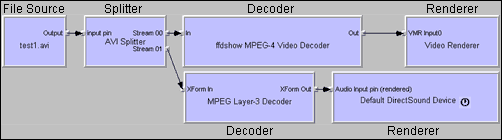 |
Now notice that the filters have Pins. Each pin contains a data stream, either input (pins on left side of the filter) or output (pins on right side of the filter). By right clicking the FFDShow input pin and selecting "Properties" we see this information screen (you must have "proppage.dll" which comes with GraphEdit registered with the system by using the "regsvr32.exe proppage.dll" command line for this dialog to show):
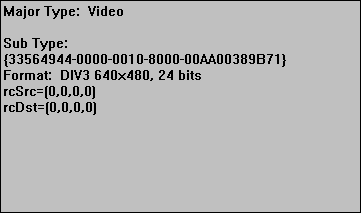 |
The thing that interests us here is the "Sub Type" string "{33564944-0000-0010-8000-00AA00389B71}". This string identifies the type of data moving between these pins. In this case, DIVX v3 data. FFDShow contains a list of Sub Types it can connect to. If the output pin presents the FFDShow decoder with a Sub Type it recognizes, it will accept the connection. But... what if there is more than one filter that can accept this Sub Type? You've guessed it: a possibility for filter conflicts.
And here is where Zoom Player's Smart Play comes into play. Instead of letting DirectShow (Windows) pick which suitable filter should be used, Zoom Player allows you to select the filters manually. And to make things quite a bit easier, Zoom Player ships with profiles that under most system configurations, do not require any manual configuration.
| NEXT |