Home > Download > Zoom Player v5.02


Download Zoom Player WMV Professional
Download Zoom Player Professional
Download Zoom Player Standard
Download Zoom Player Beta (latest non-final version)
More downloads (offline help files, language packs, etc.)
Zoom Player introduction
Upgrades
Features list (comparing the different versions of Zoom Player Standard, Professional and WMV Professional)


Download Zoom Player WMV Professional (Why WMV Pro?)
Direct Download at Inmatrix.com
Direct Download at OSNN.net
Mirror at MajorGeeks.com
Mirror at Betanews.com
Mirror at AppHit.com
Mirror at Shareware.de Mirror at i-CONICA.net
(MD5 DATA : 5D2871214BAAE0F07DC44DD7BFDD0B24)

Back to Top

Download Zoom Player Professional (Why Pro?)
Direct Download at Inmatrix.com
Direct Download at OSNN.net
Mirror at MajorGeeks.com
Mirror at Betanews.com
Mirror at AppHit.com
Mirror at Shareware.de Mirror at i-CONICA.net
(MD5 DATA : 8D4B9C263E2EBC7B72339F6F73C58562)

Back to Top

Download Zoom Player Standard
Direct Download at Inmatrix.com
Direct Download at OSNN.net
Mirror at MajorGeeks.com
Mirror at Betanews.com
Mirror at AppHit.com
Mirror at Shareware.de Mirror at i-CONICA.net
(MD5 DATA : 1D296755EE17E7804D4F5EE6FC3D9815)

Back to Top

Download Offline Help File (Windows help format).
Download Offline Help File (PDF format).
Download Language Files.
Download Additional Skins.
Download Decoders / Filters.
Download Feature List in PDF Format.
Download Latest BETA (experimental version).
View Version History.

Back to Top

Introduction:
Zoom Player was originally conceived to fill a void in Multimedia playback. Prior to Zoom Player, playing media files on the PC was either overly simplistic for the Power User or overly cryptic to the common user. Zoom Player tries to both simplify the playback experience for the common user, while giving the Power Users all the tools and interfaces they may require to manipulate their playback environment to their exact specification.

To that end, Zoom Player employs a slick and simple user interface, combined with easy to access features while at the same time providing advanced control dialogs over every feature imaginable.

Zoom Player was designed from the ground up to load quick, take as little system resources as possible, provide user feedback/direction as appropriate and maintain as much isolation from other applications and system components as not to undermine overall stability.

Zoom Player is fully scalable, supporting all the latest media formats and interfaces. New features are incorporated on an ongoing basis with release schedules and feature integration clearly announced on our support forums.

Zoom Player is capable of playing all common media formats and quite a few of the not so common, including:
AVI, Matroska (MKV), QuickTime (MOV), Cellphone 3GPP (3GP), Flash (SWF), RealMedia (RA/RM/RMVB/RAM), Windows Media Format (ASF/WMV/WMA including DRM with WMV Professional version), OGG Movie (OGM), MPEG-1 (MPG/VCD), MPEG-2 (MPG/SVCD/VOB), MPEG-4 (DIVX/XVID/ISO), VP3-VP6, MPEG Layer 3 (MP3), Vorbis Audio (OGG), Dolby Digital (AC3), Advanced Audio Coding (AAC), MusePack Audio (MPC), FLAC Audio (FLAC), OptimFROG Audio, Monkey Audio (APE), True Audio (TTU), Wave Audio (WAV), CD-Audio.

Zoom Player comes in multiple flavors:
Zoom Player Standard, a flexible feature rich Media Player that for all its features and goodness remains bloat-free, Zoom Player Professional, which on top of being a great Media Player with additional power-features, incorporates the most powerful DVD Front-End you could imagine (and even a few features you didn't think of imagining) and Zoom Player WMV Professional, adding Windows Media DRM playback support.

Zoom Player Standard remains Free for Non-Commercial use, While Zoom Player Professional and Zoom Player WMV Professional come in a Fully Functional (uncrippled) trial version, requiring registration ($27.95 and $35.95 respectively).

Back to Top


Upgrades:
Zoom Player is very upgrade friendly, you can install over previous installation without any stability issues, You do not need to uninstall a previous version of Zoom Player prior to installation. If you would like to reset your setting prior to a new installation, you can run the "DefaultSetting.exe" file that is installed with Zoom Player.

Back to Top


Features (In Detail):

Feature DescriptionStandardProfessionalWMV Professional


DVD Features:
DVD Front-End navigation using any DirectShow compatible combination of DVD Decoder filters in Overlay, VMR7 and VMR9 modes.-XX
Point and Click DVD Graph integration, including automatic inclusion of Audio and Video Processing filters (including DMO).-XX
DVD Overlay and VMR9 Hardware Color Controls including an easy to use on-screen interface (For cards that support it).-XX
Smart DVD bookmark system.-XX
Auto loading of selected bookmarks on Play to bypass previously seen DVD menus.-XX
Auto saving last disc's position for automatic resume at a later time.-XX
Auto saving of disc definition file which includes a per-disc setting for later use (Aspect Ratio Video Position, Color Values, etc...).-XX
Ability to assign DVD-Insert notification to Zoom Player or any other program.-XX
Auto-Execute external programs when a PAL/NTSC disc is detected (prior to playing).-XX
Multiple play speeds including manual specification.-XX
DVD playback from hard disk.-XX
Preferred DVD Menu Language selection.-XX
Preferred DVD Audio Track selection by Language, Number of Channels and Audio Format (AC3/DTS/ETC...).-XX
Preferred DVD Subtitle selection.-XX
External (Auto-Loading) DVD Subtitle selection.-XX
Replaceable background image for Stop Mode.-XX
Temporarily disable Auto-Play to prevent programs such as PC-Friendly popping up.-XX
DVD Trailers interface allowing you to play trailers prior to starting the movie.-XX
Automatic Aspect Ratio, Video and Blanking Position depending on the DVD type (Fullscreen, 16:9 Letterbox and 16:9 Anamorphic).-XX
Password Protected Parental Control.-XX


Media Features:
Playback of DRM Encoded Windows Media (WMV/WMA) files.--X
Customizable Media Playback mode which prevents filter conflicts on badly setup systems for improved stability and load times.-XX
Can remember last played position for media files and resume accordingly.-XX
Play incomplete AVI files.-XX
Can play locked files allowing for previewing of files downloaded from eMule and similar P2P networks without having to copy the files first.-XX
Can automatically extract and play any Archive format using user-specified extractors.-XX
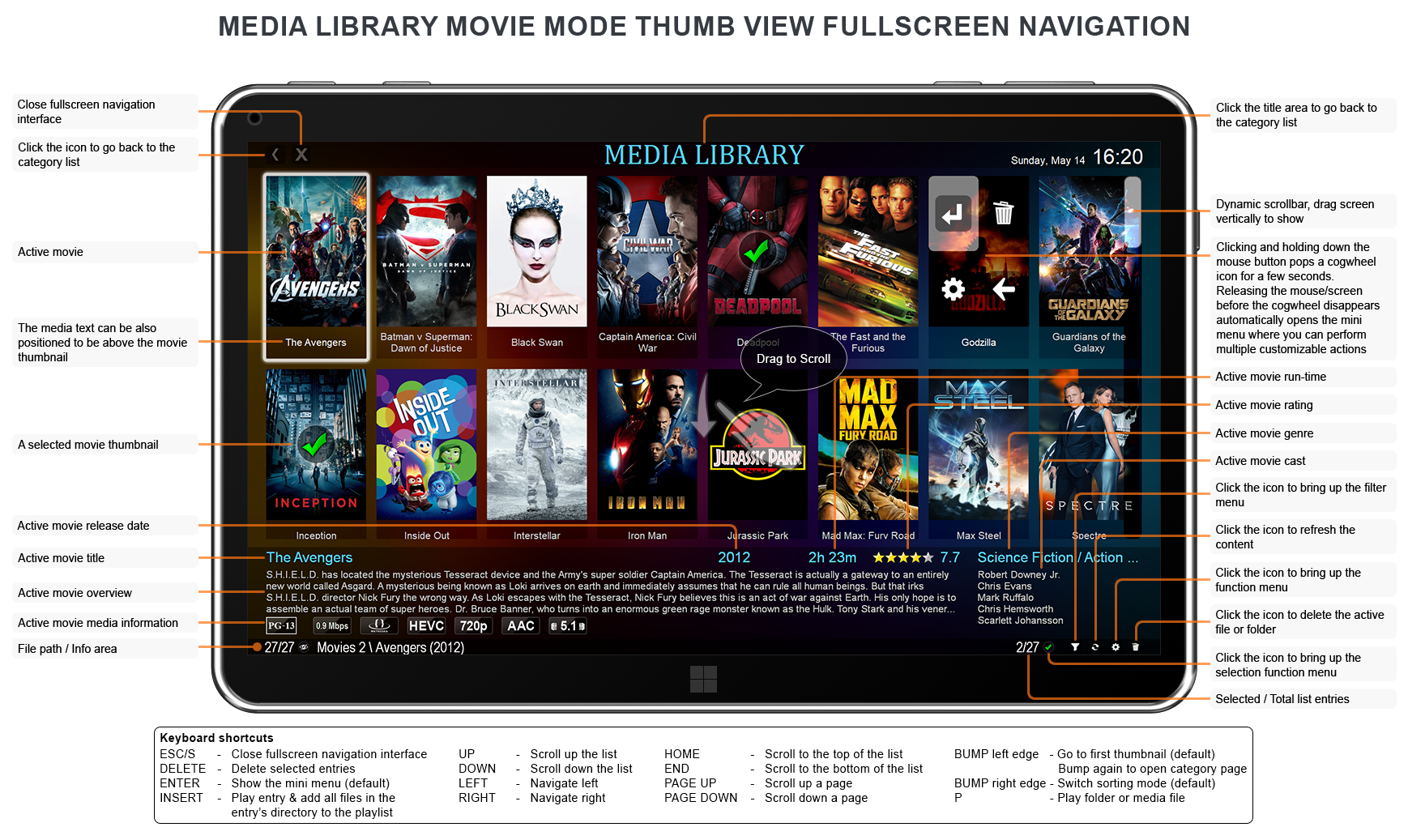
Category based Media Library for easier file navigation using a remote device.-XX
Advanced Play List Control Interface.-XX
Automatically open multi-segment files using a user-specified file mask.-XX
Automatic detection of missing decoders, including links to downloading the latest versions.XXX
Can utilize advanced media features with AVI/OGM/Matroska wrappers, including multiple audio tracks, subtitles, chaptering, auto-language detection (auto-selection of user specified languages) and more!XXX
Extensive Play List support (ZPL/B4S/M3U/WPL), including unicode file names!XXX
10-Band Equalizer and PreAmp with user selectable Presets.XXX
Black Listing of unstable/conflicting DirectShow filters.XXX
SHOUTcast streaming, including Top-500 Station listing.XXX
Manual Audio Resync feature allowing you to resync the audio on badly encoded content.XXX
DirectShow Filter Manager allowing user-managed filter conflict resolution.XXX
Per-File Chaptering system.XXX
File definition system allowing you to save pertinent information on played file which can be recalled the next time the file is opened.XXX
Easy access to popular audio/video interfaces such as DivX/MPEG-4 dialogs, DirectVobSub language selection, etc...XXX
Fast Play support for most media formats (as long as your CPU can keep up).XXX
Fast Forward support in all media formats.XXX
Rewind support in all media formats.XXX
Folder Images for Audio Files so you can have the Album image appear while listening to the music.XXX
Enhanced Play Complete control allowing you to control what actions are taken when playback ends.XXX
MP3 ID3, APE Tag and WMA Tag information visualization. Customizable, including screen position, display order, smart display (only show entered information).XXX
Support for Windows Media Format 9 High Resolution Audio Renderering and multi-channel support.XXX
Auto-Play Media CDs on insert.XXX
Bilinear Smooth Scaled Image Slideshow capability.XXX
Fully integrated with the system shell (Play/Enqueue).XXX
Easily associate with any file format, including an icon navigator allowing you to easily customize the icons used for association.XXX
Can show random trailers infront of your Movies.XXX


Additional Features:
OSD Navigation systems for Files, Blanking, Bookmarks, Chapters and Play Lists (in addition to the editor interfaces).-XX
Pattern Calibration System, along with White Wash support.-XX
Multilingual (Translated into multiple languages) support.XXX
Basic and Advanced options dialog making Zoom Player easy for the novice while allowing ultimate flexibility for the advanced user.XXX
Support for Local Configuration file.XXX
Works with most windows operating systems.XXX
Light-Weight and doesn't take over your system configuration.XXX
DVD, Media and Audio skin modes.XXX
Automatic Skin Switching according to content (DVD/Media/Audio).XXX
Fully dynamically skinned, including Full support for skin color-tinting.XXX
Dynamic range of Aspect Ratio settings including non square pixels relative adjustment, manual Fit-To-Rectangle Aspect Ratio, Anamorphic Aspect Ratio and even a Custom user-specified ratio.XXX
Easy control of Video Size and Positioning to reduce image overscan when used in conjunction with a TV-Output device.XXX
10 Manual presets for use with Video Positioning (can also be used with multi-monitor setup for advanced positioning).XXX
10 Manual presets for use with Aspect RatiosXXX
10 Manual presets for use with Color ControlsXXX
Fully keyboard mapped feature-set covering every function used by the player (useful for Remote devices).XXX
Programmable keyboard editor, including support for chaining multiple functions to one key.XXX
Advanced mouse controls with per-button function allocation including a wide array of wheel supported features (useful for remote mouse controls).XXX
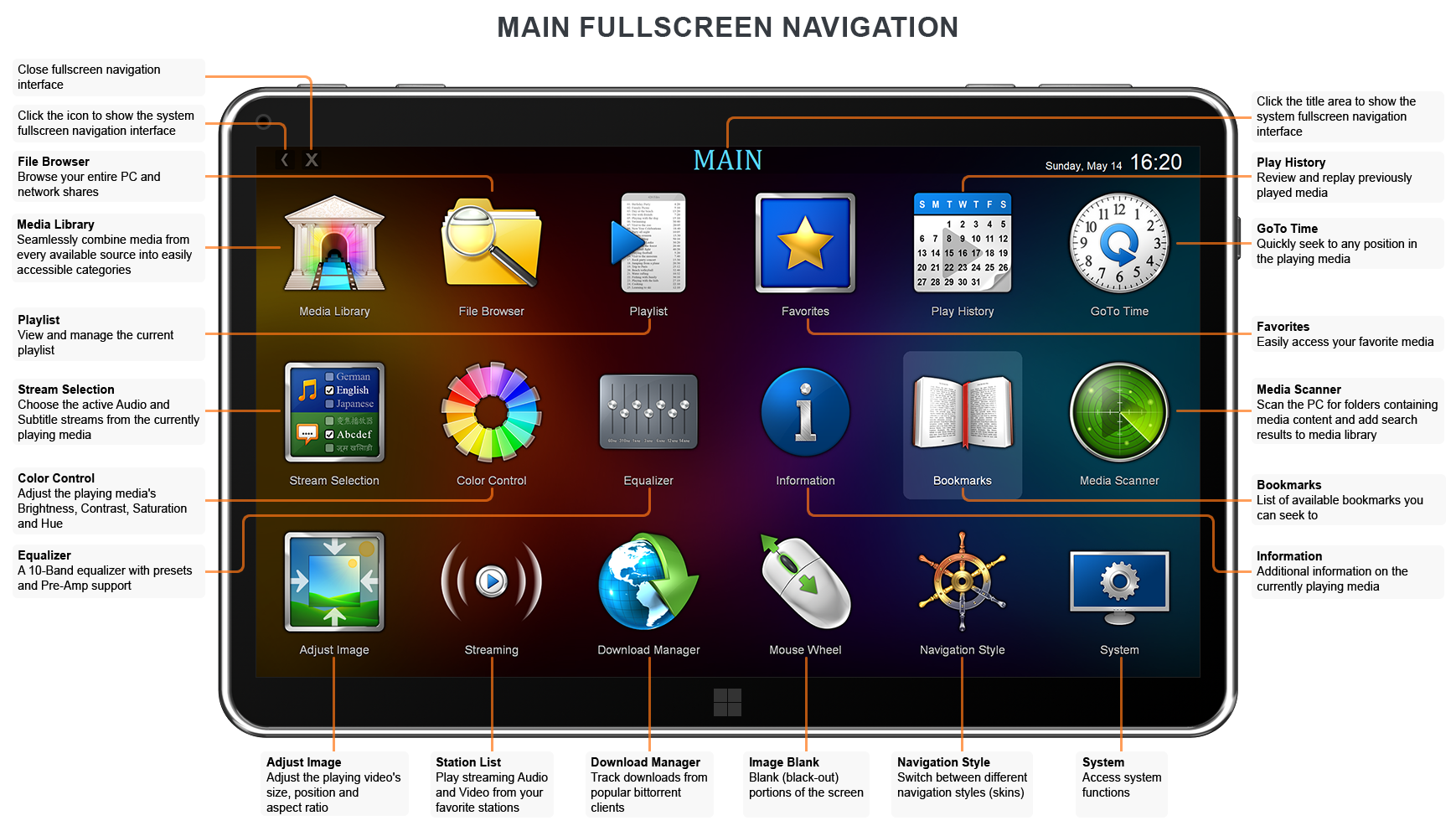
Dynamic Control Bar for easy navigation while in full screen mode, complete with selectable on-bar features.XXX
3-Mode time skipping programmable navigation speeds for quickly seeking forward/backward within the time-line.XXX
Multiple Customizable Context Menus with extensive support for both DVD and Media modes.XXX
Extensive command line support.XXX
Video Orbiting system to prevent screen-burns on high end projectors and television sets.XXX
Blanking support to cover up non-black area of encoded Video (useful for widescreen DVDs or badly encoded media files).XXX
Configurable On-Screen-Display.XXX
Remote Communication API (TCP/IP and SendMessage) supported by popular LCD and Remote display devices.XXX
Girder Control File Export for maximum control through a remote device and System Automation.XXX
Automatic DirectShow filter registration/unregistration using a user-specified control file.XXX
DirectShow filter registration service.XXX
Scene Cut interface allowing you to dynamically change playback chronology without altering the actual files.XXX
An Interface to easily seek into any position using either HH:MM:SS:MS interface, or by entering a specific frame number.XXX
Ability to override Audio Output to any supported sound device.XXX
Extended VMR7 and VMR9 Video Output.XXX
Shortcut File Parsing for easy redirect of DVD and Media files.XXX
User specified registry location so that multiple copies of the player can be run using different settings all at the same time.XXX
Web URL Navigation system allowing you to associate DVD and Media files with a URL or local information files.XXX
Full support for GraphEdit ".GRF" files.XXX
Ability to change screen resolution when going into fullscreen.XXX
Docking to Windows and Advanced Magnetic Docking capabilities.XXX
Fully complient with Multi-Monitor setups.XXX

While some of the settings may seem intimidating, you can rest assured that the on-line help covers each function in detail. Be it Keyboard, Mouse or Remote Control, Zoom Player was designed for you.

Get Notified (news sites and magazines only):
If you are interested in receiving information and updates regarding latest versions please send an eMail containing your site / magazine name and relevant contact information.

Important:
A lot of trash can get installed on your computer over time which can cause problems with media playback (not just with this player, but in general). To that end, I've written a guide dealing with the proper system configuration for media playback, make sure you read it.

Back to Top